General
PakistanProud
Moderator
- Joined
- Jan 24, 2024
- Messages
- 398
- Likes
- 242
- Nation

- Residence

- Axis Group

Easy change your layout and other options by following the steps below:
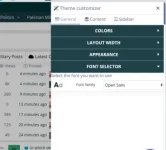
1.) Click on the 'Theme Customizer' icon.

2.) Change your colors, layout width, appearance (dark, light) and fonts under the 'general' section.

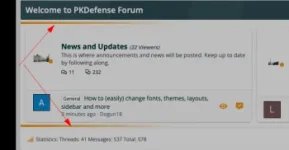
3.) Depending on where you are on the forum (home, threads, forum views, etc.) you will have more options to choose from. In the homepage view, you can change sidebar positions, collapse the sidebar, and even change node layouts.

More fonts and options will be available in the near future.
PKDefense
1.) Click on the 'Theme Customizer' icon.
2.) Change your colors, layout width, appearance (dark, light) and fonts under the 'general' section.
3.) Depending on where you are on the forum (home, threads, forum views, etc.) you will have more options to choose from. In the homepage view, you can change sidebar positions, collapse the sidebar, and even change node layouts.
More fonts and options will be available in the near future.
PKDefense